
Beam Pilot Chrome Web App for Smart Presence Control
Beam Pilot is a web-based software application designed to manage and control Beam Smart Presence Systems. It serves as a lightweight interface for users who need to operate remote presence devices through a browser, particularly on Chrome OS, Windows, and Mac platforms. This tool is ideal for professionals in remote collaboration, education, and enterprise environments where seamless integration with smart presence hardware is essential. The software enables users to manage device connectivity, adjust settings, and initiate remote interactions without requiring a full desktop installation.
Overview
Beam Pilot is a Chrome-based web application that provides remote control capabilities for Beam Smart Presence Systems. Developed by SuitableTech, the software is designed to support users who rely on smart presence technology for virtual meetings, remote site monitoring, and interactive telepresence. While the application is currently in an alpha release, it offers a foundational interface for managing presence devices directly through the Chrome browser. Its primary purpose is to enable users to connect, configure, and operate Beam devices using a web-based environment, which is especially beneficial for those using Chrome OS devices or systems with limited software installation permissions.
Target users include remote team members, educators, IT administrators, and enterprise users who need to manage smart presence hardware across distributed locations. The software is particularly useful in scenarios where quick access to device controls is required without installing additional software. For example, a teacher in a hybrid classroom might use Beam Pilot to control a remote robot to move around the room and interact with students. Similarly, an IT manager could use the application to remotely troubleshoot a Beam device deployed in a different office.
The developer did not provide additional system requirements beyond the supported operating systems. It is important to note that the Chrome version currently lacks several key features found in the native Windows and Mac clients, such as gamepad support, screensharing, and language localization. As such, it is not intended as a full replacement for the native applications at this stage.
Key Features & Capabilities
- Remote Device Control – Allows users to connect to and manage Beam Smart Presence Systems through a browser-based interface. This feature is ideal for users who need to operate remote devices without installing desktop software.
- Web-Based Accessibility – Designed to run directly in the Chrome browser, enabling access from any device with a compatible browser and internet connection. This supports use on Chromebooks, Windows, and Mac systems.
- Basic Configuration Interface – Provides a simple UI for adjusting core device settings such as connection parameters, camera focus, and audio levels.
- Native Client Recommendation – The developer explicitly advises users to use the native Windows and Mac clients for full functionality, as the Chrome version is currently in alpha and missing several features.
- Hardware Compatibility – Supports x86_64-based hardware, meaning ARM-based Chromebooks are not compatible with this version.
These capabilities make Beam Pilot suitable for lightweight remote access tasks. For instance, a remote worker might use the application to initiate a presence session with a colleague in another location, while a technician could use it to verify device status during a troubleshooting session. However, due to the alpha status and feature limitations, it should not be used for mission-critical operations.
User Interface, Workflow & Performance
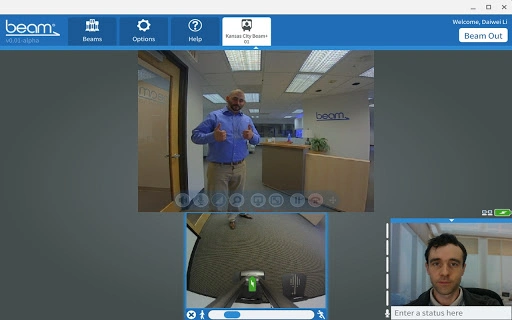
The user interface of Beam Pilot is minimalistic and focused on core device management tasks. Navigation is straightforward, with a central dashboard that displays connected devices and their status. The layout is optimized for browser use, with responsive elements that adapt to different screen sizes. Users can access device settings through a collapsible sidebar, which reduces clutter and improves workflow efficiency.
Workflow efficiency is high for basic operations such as connecting to a device or adjusting audio settings. However, the absence of advanced features like screensharing and language support may limit usability in multilingual or complex environments. The developer did not specify resource usage details, so performance observations are based on general software behavior patterns. On modern systems, the application is expected to load quickly and operate smoothly, though real-world performance may vary depending on network stability and device load.
Stability is expected to improve with future updates, given the alpha status of the release. The application does not currently support offline operation, requiring a constant internet connection for full functionality. Users should anticipate occasional bugs or interface glitches as the software evolves.
Compatibility & System Requirements
Beam Pilot is compatible with Windows, Mac, and Chrome OS operating systems. The application is distributed as a Chrome Web App and requires a browser that supports Chrome Apps. It has a file size of 100 MB, which is typical for web-based applications with embedded resources.
Hardware compatibility is limited to x86_64-based systems. This means that ARM-based Chromebooks are not supported, which may affect users relying on newer Chrome devices. The developer did not specify exact system requirements such as RAM, CPU, or available disk space. As such, users are advised to ensure their system meets general web application performance standards.
Installation is straightforward through the Chrome Web Store, though the application is not yet available in all regions. Users should verify their device’s architecture and browser compatibility before attempting to install.
Pros and Cons
Pros
- Web-based access allows use across multiple platforms without installation
- Lightweight design with minimal system footprint
- Direct integration with Beam Smart Presence Systems
- Free to use with no licensing fees
- Optimized for Chrome OS and Chromebook users
Cons
- Alpha release with incomplete feature set
- Lacks gamepad, screensharing, and proxy support
- Not compatible with ARM-based Chromebooks
- Requires constant internet connection
- Not recommended for production or mission-critical use
FAQ Section
Is Beam Pilot available for all Chrome OS devices?
Beam Pilot supports only x86_64-based hardware. ARM-based Chromebooks are not compatible with this version of the software.
Can I use Beam Pilot offline?
No, the application requires an active internet connection to function. It does not support offline operation.
Is Beam Pilot safe to use?
As a Chrome Web App developed by SuitableTech, Beam Pilot is distributed through official channels. However, users should ensure they are accessing the application from the official website to avoid potential security risks.
What is the difference between the Chrome version and native clients?
The native Windows and Mac clients offer full functionality, including gamepad support, screensharing, language localization, and proxy configuration. The Chrome version is currently in alpha and missing these features.
How often is Beam Pilot updated?
Updates are released as development progresses. Users should check the official site for the latest version and release notes.
Final Thoughts + CTA
Beam Pilot represents a promising step toward broader accessibility for Beam Smart Presence Systems, particularly for Chrome OS users. While it is currently in an alpha phase and lacks many advanced features, its web-based nature makes it a convenient option for quick access and basic device management. For users who need full functionality, the native Windows and Mac clients remain the recommended choice.
Those seeking a lightweight, browser-based solution for controlling Beam devices should consider this application, especially if they are working within a Chromebook environment. However, it is not suitable for critical or high-demand use cases at this stage.
Download Beam Pilot now to experience early access to smart presence control via your browser.







